

2024 MeteoAG widget setup guide with concrete live examples
/0. Quick rule: where the measurand IDs come from
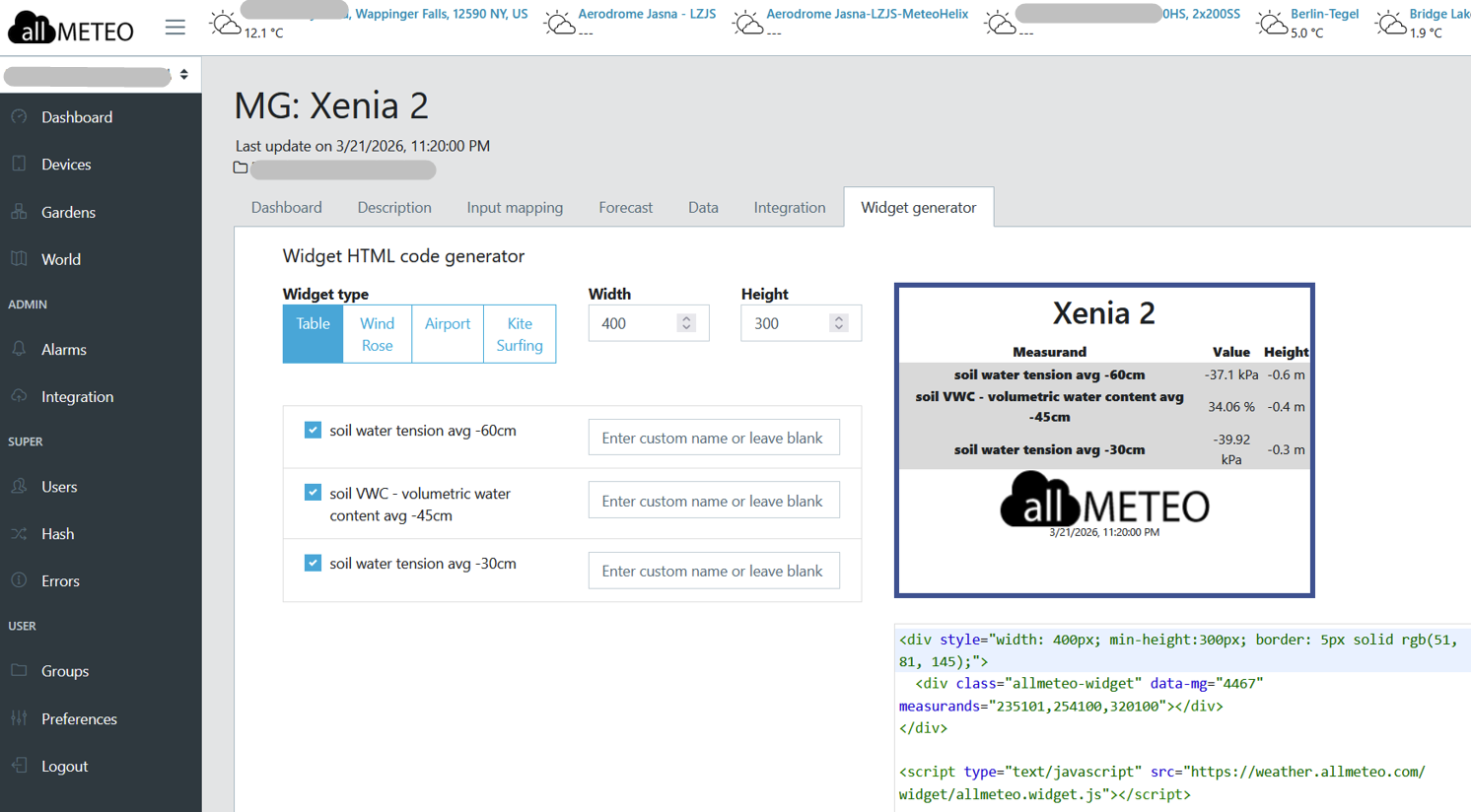
Widget Generator on the weather.allmeteo.com portal in your MeteoGarden section will generate the basic html code with the correct MeteoGardgen Number and if you select the checkboxes, the Correct Measurands.
Per your workflow, the **source of measurand IDs is the allmeteo widget generator in the MeteoGarden section**.
Practical workflow:
1. Pick the MeteoGarden station in the generator.
1. Select the measurands you want there.
1. Copy those measurand IDs into `measurands="..."`.
1. Reuse the same IDs in the other attributes where needed:
`inverted`
`expanded`
`thresholds`
`range`
`area`
1. Outer colors, border thickness, and layout are then finished in the page HTML / CSS wrapper.
Important distinction:
Generator side gives you the station and measurand IDs.
Page HTML side controls layout, grouping, border color, card background, and the threshold / area behavior you want on the final page.
1. Live example index
Use this section as the quickest jump table when you want to see a working result.
- Pattern Concrete live example URL Standard MG air widget
22. Xenia,23. Čerešne Lipnica,24. Marhule``https://wind101.net/widgets/danubius-mg - 2× WaterMark, 15/35 bands
44. Samozber 2025 1,45. Samozber 2025 2,46. Xenia 1``https://wind101.net/widgets/danubius-zavlaha-alzbetin-dvor - 2× WaterMark, 15/35 bands
48. Čerešne Lipnica 1,49. Čerešne Lipnica 2,50. Čerešne Lipnica 3``https://wind101.net/widgets/danubius-zavlaha-dunajska-luzna - 2× WaterMark + 10HS VWC, 15/35 + 32/37 bands
52. Marhule 1,53. Marhule 2``https://wind101.net/widgets/danubius-zavlaha-fruit-star - 2× WaterMark + 10HS VWC, 15/35 + 32/37 bands
47. Xenia 2``https://wind101.net/widgets/danubius-zavlaha-alzbetin-dvor - 2× WaterMark + 10HS VWC, 15/35 + 32/37 bands
51. Čerešne Lipnica 4``https://wind101.net/widgets/danubius-zavlaha-dunajska-luzna - 2× WaterMark + soil temperature, 15/55 bands
7. Ceresne AS 1 RAD 10``https://wind101.net/widgets/danubius-zavlaha - Older 2× WaterMark + VWC, 15/55 + 28/40 bands
8. Ceresne AS 2 RAD 70,9. Ceresne SS 2 RAD 123``https://wind101.net/widgets/danubius-zavlaha - Wind / runway widget runway + wind widget
https://wind101.net/widgets/airport-lzru - Public-facing page embedding / linking that airport implementation Aeroklub Ružomberok weather page
https://www.aeroklubruzomberok.sk/pocasie/
2. What each layer controls
A MeteoAG card has two layers.
A. Outer HTML/CSS wrapper
This controls:
- card width,
- card height / minimum height,
- card background color,
- border color,
- border thickness,
- border line type.
Example:
<div style="background-color: #FDEBD0; width: 400px; min-height:300px; border: 5px solid rgb(51, 81, 145);">
  ...widget goes here...
</div>
What this means:
background-color: #FDEBD0= pale orange card background,width: 400px= fixed card width,min-height:300px= minimum card height,border: 5px solid ...= border thickness + type + color.
B. Inner widget element
This controls:
- which station is used,
- which measurands are displayed,
- which series are inverted,
- which series are expanded,
- thresholds,
- area fills,
- chart axis range,
- basic chart colors.
Template:
<div class="allmeteo-widget"
     data-mg="..."
     measurands="..."
     inverted="..."
     expanded="..."
     thresholds="..."
     range="..."
     area="..."
     color-bg="white"
     color-text="black"
     color-line="black"
     color-axis="black"
     color-threshold="white"></div>
3. What is confirmed from the supplied HTML
Confirmed widget attributes
data-mgmeasurandsmeasurandsNamesnamethresholdsarearangeinvertedexpandedcolor-bgcolor-textcolor-linecolor-axiscolor-thresholdwindrunway
Confirmed outer CSS controls
background-colorwidthheight/min-heightborder
Not confirmed from the supplied HTML
The supplied HTML does not confirm a separate HTML attribute for:
- per-series line color,
- dashed vs solid chart lines,
- chart line thickness,
- explicit min/max label on/off switches,
- legend position.
So for now:
- border thickness / border style = CSS wrapper,
- chart line color =
color-line, - per-series line style or thickness = not confirmed in these files.
4. Field-by-field explanation with concrete examples
data-mg
The MeteoGarden station ID.
data-mg="4465"Concrete live examples:
4458=52. Marhule 1onhttps://wind101.net/widgets/danubius-zavlaha-fruit-star4465=53. Marhule 2onhttps://wind101.net/widgets/danubius-zavlaha-fruit-star4466=46. Xenia 1onhttps://wind101.net/widgets/danubius-zavlaha-alzbetin-dvor4467=47. Xenia 2onhttps://wind101.net/widgets/danubius-zavlaha-alzbetin-dvor4461to4464=48–51. Čerešne Lipnica 1–4onhttps://wind101.net/widgets/danubius-zavlaha-dunajska-luzna
measurands
Comma-separated list of measurand IDs.
Examples used in the supplied files:
320101,235101= 2× WaterMark pattern320101,235101,254100= 2× WaterMark + 10HS VWC235101,254100,320100= same 3-channel family, different series order320101,235101,280101,225100= 2× WaterMark + soil temperature family10100,20100,40100,51100,110900,180900= standard MG air widget310100,270100= airport grass-runway example
Concrete live examples:
measurands="320101,235101"→44. Samozber 2025 1,45. Samozber 2025 2,46. Xenia 1measurands="320101,235101,254100"→47. Xenia 2,53. Marhule 2,51. Čerešne Lipnica 4measurands="235101,254100,320100"→52. Marhule 1measurands="320101,235101,280101,225100"→7. Ceresne AS 1 RAD 10measurands="10100,20100,40100,51100,110900,180900"→ MG air cards onhttps://wind101.net/widgets/danubius-mg
thresholds
Syntax:
thresholds="measurand|value,measurand|value,..."Examples:
thresholds="320101|15,320101|35,235101|15,235101|35"
thresholds="320101|15,320101|35,235101|15,235101|35,254100|32,254100|37"
thresholds="320101|15,320101|55,235101|15,235101|55"
Concrete live interpretations:
15 / 35= the newer orchard pattern used in March 2026 AG widgets15 / 55= older wider middle band pattern32 / 37= VWC thresholds in the March 2026 examples28 / 40= older VWC thresholds in older cherry examples270100|0in the airport example creates a zero threshold for the secondary channel
area
Syntax:
area="measurand|min|max|color,measurand|min|max|color,..."The files use 8-digit hex colors with alpha transparency.
Common orchard colors:
#568a9980= lower band#6daa5d80= middle band#a4801d80= upper band
Common VWC pattern in March 2026 examples:
254100|37|max|#568a9980,
254100|32|37|#6daa5d80,
254100|0|32|#a4801d80
This means the VWC colors are arranged in the reverse direction from the tension-style WaterMark channels.
Concrete live examples:
- March 2026 VWC examples:
52. Marhule 1,53. Marhule 2,47. Xenia 2,51. Čerešne Lipnica 4 - older 15/55 WaterMark family:
7. Ceresne AS 1 RAD 10 - airport min/max placeholder example:
https://wind101.net/widgets/airport-lzru
range
Observed formats:
range="320101:0,235101:0"
range="320101:0:70,235101:0:70"
range="254100:25:40"
range="310100:-70:0,270100:-10:30"
Working interpretation from the live examples:
measurand:min= fixed lower bound, upper bound automaticmeasurand:min:max= both lower and upper bound fixed
Concrete live examples:
range="320101:0:70,235101:0:70"→ March 2026 2× WaterMark examplesrange="254100:25:40"→ March 2026 VWC examplesrange="310100:-70:0,270100:-10:30"→ airport negative-scale runway example
inverted
Lists the series drawn inverted.
Examples:
inverted="320101,235101"
inverted="235101,320100"
inverted="310100"
Concrete live usage:
- WaterMark channels are commonly inverted
- VWC is normally not inverted in the cleaner March 2026 orchard examples
- the airport page shows one example with a positive-value series rendered via inversion
expanded
Lists the series expanded into separate plots / panels.
Examples:
expanded="320101,235101"
expanded="320101,235101,254100"
expanded="320101,235101,280101,225100"
Concrete live rule:
- if the series should be shown as its own visible panel, include it in
expanded - the March 2026 VWC examples expand all three channels
- the older soil temperature example expands all four channels
color-bg, color-text, color-line, color-axis, color-threshold
The AG pages use this standard inner-widget palette almost everywhere:
color-bg="white"
color-text="black"
color-line="black"
color-axis="black"
color-threshold="white"
Concrete note:
- the card border color is not controlled here; that comes from the outer CSS wrapper
color-lineis confirmed as a single widget-level value in the supplied HTML- separate per-series chart colors are not confirmed in these files
name
Optional station-title override.
Commented example from the source:
<div id="molda2" class="allmeteo-widget" name="ZV1 PD BA" data-mg="16" ...>Use this when you want the rendered widget heading to use a different display name than the default station name.
measurandsNames
Optional per-series label override.
Commented source example:
measurands="10100,10200,10300,20100,30100"
measurandsNames="Temperature,,,,"
This is useful when you want to relabel only one series and leave the others on their defaults.
wind and runway
Special wind widget mode:
<div class="allmeteo-widget" data-mg="3185" wind runway="06"></div>Concrete live example:
https://wind101.net/widgets/airport-lzru
5. Copy-paste setup library with live URLs
A. Standard MG air widget
Used on danubius-mg for Xenia, Čerešne Lipnica, and Marhule.
<div style="width: 400px; height:300px; border: 5px solid green;">
  <div class="allmeteo-widget" data-mg="4470"
       measurands="10100,20100,40100,51100,110900,180900"></div>
</div>
Where to see it live:
https://wind101.net/widgets/danubius-mg- look for
22. Xenia
Same pattern also appears there as:
23. Čerešne Lipnicawithdata-mg="4468"24. Marhulewithdata-mg="4469"
Use when:
- you want the default MG air-weather card,
- no irrigation-specific threshold bands are needed.
B. 2× WaterMark with 15 / 35 bands
Example B1 — Samozber 2025 1
<div style="background-color: #C0EAFA; width: 400px; min-height:300px; border: 5px solid rgb(51, 81, 145);">
  <div class="allmeteo-widget" data-mg="4459" measurands="320101,235101"
       inverted="320101,235101"
       expanded="320101,235101"
       thresholds="320101|15,320101|35,235101|15,235101|35"
       range="320101:0:70,235101:0:70"
       area="320101|0|15|#568a9980,320101|15|35|#6daa5d80,320101|35|max|#a4801d80,
             235101|0|15|#568a9980,235101|15|35|#6daa5d80,235101|35|max|#a4801d80"
       color-bg="white" color-text="black" color-line="black"
       color-axis="black" color-threshold="white"></div>
</div>
Where to see it live:
https://wind101.net/widgets/danubius-zavlaha-alzbetin-dvor- look for
44. Samozber 2025 1
Example B2 — Xenia 1
Same pattern, green outer wrapper:
<div style="background-color: #C0FACB; width: 400px; min-height:300px; border: 5px solid rgb(51, 81, 145);">
  <div class="allmeteo-widget" data-mg="4466" measurands="320101,235101"
       inverted="320101,235101"
       expanded="320101,235101"
       thresholds="320101|15,320101|35,235101|15,235101|35"
       range="320101:0:70,235101:0:70"
       area="320101|0|15|#568a9980,320101|15|35|#6daa5d80,320101|35|max|#a4801d80,
             235101|0|15|#568a9980,235101|15|35|#6daa5d80,235101|35|max|#a4801d80"
       color-bg="white" color-text="black" color-line="black"
       color-axis="black" color-threshold="white"></div>
</div>
Where to see it live:
https://wind101.net/widgets/danubius-zavlaha-alzbetin-dvor- look for
46. Xenia 1
Example B3 — Čerešne Lipnica 1
Same inner chart, peach outer wrapper:
https://wind101.net/widgets/danubius-zavlaha-dunajska-luzna- look for
48. Čerešne Lipnica 1
Use when:
- station has two WaterMark channels,
- no VWC channel,
- you want the newer tighter
15 / 35interpretation.
C. 2× WaterMark + 10HS VWC with 15 / 35 and 32 / 37 bands
Example C1 — Marhule 1
<div style="background-color: #FDEBD0; width: 400px; min-height:300px; border: 5px solid rgb(51, 81, 145);">
  <div class="allmeteo-widget" data-mg="4458" measurands="235101,254100,320100"
       inverted="235101,320100"
       expanded="235101,254100,320100"
       thresholds="235101|15,235101|35,254100|32,254100|37,320100|15,320100|35"
       range="235101:0:70,254100:25:40,320100:0:70"
       area="235101|0|15|#568a9980,235101|15|35|#6daa5d80,235101|35|max|#a4801d80,
             254100|37|max|#568a9980,254100|32|37|#6daa5d80,254100|0|32|#a4801d80,
             320100|0|15|#568a9980,320100|15|35|#6daa5d80,320100|35|max|#a4801d80"
       color-bg="white" color-text="black" color-line="black"
       color-axis="black" color-threshold="white"></div>
</div>
Where to see it live:
https://wind101.net/widgets/danubius-zavlaha-fruit-star- look for
52. Marhule 1
Example C2 — Marhule 2
<div style="background-color: #FDEBD0; width: 400px; min-height:300px; border: 5px solid rgb(51, 81, 145);">
  <div class="allmeteo-widget" data-mg="4465" measurands="320101,235101,254100"
       inverted="320101,235101"
       expanded="320101,235101,254100"
       thresholds="320101|15,320101|35,235101|15,235101|35,254100|32,254100|37"
       range="320101:0:70,235101:0:70,254100:25:40"
       area="320101|0|15|#568a9980,320101|15|35|#6daa5d80,320101|35|max|#a4801d80,
             235101|0|15|#568a9980,235101|15|35|#6daa5d80,235101|35|max|#a4801d80,
             254100|37|max|#568a9980,254100|32|37|#6daa5d80,254100|0|32|#a4801d80"
       color-bg="white" color-text="black" color-line="black"
       color-axis="black" color-threshold="white"></div>
</div>
Where to see it live:
https://wind101.net/widgets/danubius-zavlaha-fruit-star- look for
53. Marhule 2
Example C3 — Xenia 2
Same 3-channel March 2026 pattern:
https://wind101.net/widgets/danubius-zavlaha-alzbetin-dvor- look for
47. Xenia 2 data-mg="4467"
Example C4 — Čerešne Lipnica 4
Same 3-channel March 2026 pattern:
https://wind101.net/widgets/danubius-zavlaha-dunajska-luzna- look for
51. Čerešne Lipnica 4 data-mg="4464"
Use when:
- station has two WaterMark channels and one 10HS VWC channel,
- you want the March 2026 orchard style,
- VWC should use the
32 / 37band pair.
D. 2× WaterMark + soil temperature with 15 / 55 bands
Concrete source example:
<div class="allmeteo-widget" data-mg="2758"
     measurands="320101,235101,280101,225100"
     inverted="320101,235101"
     expanded="320101,235101,280101,225100"
     thresholds="320101|15,320101|55,235101|15,235101|55"
     range="320101:0,235101:0"
     area="320101|0|15|#568a9980,320101|15|55|#6daa5d80,320101|55|max|#a4801d80,
           235101|0|15|#568a9980,235101|15|55|#6daa5d80,235101|55|max|#a4801d80"
     color-bg="white" color-text="black" color-line="black"
     color-axis="black" color-threshold="white"></div>
Where to see it live:
https://wind101.net/widgets/danubius-zavlaha- look for
7. Ceresne AS 1 RAD 10
Use when:
- you want the older
15 / 55WaterMark family, - the soil-temperature channels should be shown too,
- thresholds apply only to the WaterMark channels.
E. Older VWC example with 15 / 55 and 28 / 40 bands
Example E1 — Ceresne AS 2 RAD 70
<div class="allmeteo-widget" data-mg="2772"
     measurands="320100,235100,254100"
     inverted="320100,235100"
     expanded="320100,235100,254101"
     thresholds="320100|15,320100|55,235101|15,235101|55,254100|28,254100|40"
     range="320100:0,235100:0,254100:0"
     area="320100|0|15|#568a9980,320100|15|55|#6daa5d80,320100|55|max|#a4801d80,
           235101|0|15|#568a9980,235101|15|55|#6daa5d80,235101|55|max|#a4801d80,
           254100|40|max|#568a9980,254100|28|40|#6daa5d80,254100|0|28|#a4801d80"
     color-bg="white" color-text="black" color-line="black"
     color-axis="black" color-threshold="white"></div>
Where to see it live:
https://wind101.net/widgets/danubius-zavlaha- look for
8. Ceresne AS 2 RAD 70
Example E2 — Ceresne SS 2 RAD 123
https://wind101.net/widgets/danubius-zavlaha- look for
9.Ceresne SS 2 RAD 123 data-mg="2803"- the same older VWC threshold family appears there too
Use when:
- you need to follow an older legacy orchard convention,
- the VWC thresholds should be
28 / 40instead of32 / 37.
F. Wind / runway example
This is a useful special-case example because it shows both wind / runway mode and a custom two-measurand soil/runway chart.
F1 — wind widget
<div class="allmeteo-widget" data-mg="3185" wind runway="06"></div>F2 — positive-value + inverted rendering
<div class="allmeteo-widget" data-mg="3185"
     measurands="310100,270100"
     inverted="310100"
     expanded="310100,270100"
     thresholds="310100|15,310100|55,270100|0"
     range="310100:0:70,270100:-10:30"
     area="310100|0|15|#FF000080,310100|15|55|#FFC0CB80,310100|55|max|#FFFFFF80,
           270100|min|0|#cce6f480,270100|0|max|#ffdd0340"
     color-bg="white" color-text="black" color-line="black"
     color-axis="black" color-threshold="red"></div>
F3 — negative-scale rendering
<div class="allmeteo-widget" data-mg="3185"
     measurands="310100,270100"
     inverted=""
     expanded="310100,270100"
     thresholds="310100|-15,310100|-55,270100|0"
     range="310100:-70:0,270100:-10:30"
     area="310100|-15|0|#FF000080,310100|-55|-15|#FFC0CB80,310100|min|-55|#FFFFFF80,
           270100|min|0|#cce6f480,270100|0|max|#ffdd0340"
     color-bg="white" color-text="black" color-line="black"
     color-axis="black" color-threshold="red"></div>
Where to see it live:
- direct widget page:
https://wind101.net/widgets/airport-lzru - public page using that implementation:
https://www.aeroklubruzomberok.sk/pocasie/
Use when:
- you need a wind widget,
- you need runway-oriented weather display,
- or you want to compare positive-scale + inversion vs negative-scale rendering.
6. Outer wrapper color examples users can copy
These are page-level presentation choices, not inner widget attributes.
Fruit Star / Marhule AG card background
background-color: #FDEBD0;Alžbetin Dvor / Samozber AG card background
background-color: #C0EAFA;Alžbetin Dvor / Xenia AG card background
background-color: #C0FACB;Dunajská Lužná / Čerešne Lipnica AG card background
background-color: #FACCC0;Common orchard border
border: 5px solid rgb(51, 81, 145);MG air card border colors
Examples visible on https://wind101.net/widgets/danubius-mg:
- Miloslavov / Fruit Star:
border: 5px solid green; - Dunajská Lužná:
border: 5px solid lightskyblue; - Ostratice:
border: 5px solid yellow; - Žitava:
border: 5px solid pink;
These are the visible group colors users see on the live MG / Helix pages.
7. Recommended build workflow
- Get the exact
data-mgstation ID. - Use the allmeteo widget generator in the MeteoGarden section to choose the correct measurands.
- Start from the nearest live pattern in this guide.
- Copy the exact
measurandslist. - Mirror the same measurand IDs into:
invertedexpandedthresholdsrangearea
- Pick the correct threshold family:
15 / 35for newer March 2026 orchard AG widgets,15 / 55for older legacy orchard AG widgets,32 / 37or28 / 40for VWC depending on the legacy you are following.
- Set the outer wrapper background and border for the correct orchard / group.
- Check the live example URL from this guide side by side with the new widget.
8. Short cheat sheet
New March 2026 2× WaterMark only
measurands="320101,235101"
inverted="320101,235101"
expanded="320101,235101"
thresholds="320101|15,320101|35,235101|15,235101|35"
range="320101:0:70,235101:0:70"
area="320101|0|15|#568a9980,320101|15|35|#6daa5d80,320101|35|max|#a4801d80,
      235101|0|15|#568a9980,235101|15|35|#6daa5d80,235101|35|max|#a4801d80"
Live references:
https://wind101.net/widgets/danubius-zavlaha-alzbetin-dvorhttps://wind101.net/widgets/danubius-zavlaha-dunajska-luzna
New March 2026 2× WaterMark + 10HS VWC
measurands="320101,235101,254100"
inverted="320101,235101"
expanded="320101,235101,254100"
thresholds="320101|15,320101|35,235101|15,235101|35,254100|32,254100|37"
range="320101:0:70,235101:0:70,254100:25:40"
area="320101|0|15|#568a9980,320101|15|35|#6daa5d80,320101|35|max|#a4801d80,
      235101|0|15|#568a9980,235101|15|35|#6daa5d80,235101|35|max|#a4801d80,
      254100|37|max|#568a9980,254100|32|37|#6daa5d80,254100|0|32|#a4801d80"
Live references:
https://wind101.net/widgets/danubius-zavlaha-fruit-starhttps://wind101.net/widgets/danubius-zavlaha-alzbetin-dvorhttps://wind101.net/widgets/danubius-zavlaha-dunajska-luzna
Standard MG air card
measurands="10100,20100,40100,51100,110900,180900"Live reference:
https://wind101.net/widgets/danubius-mg
Wind / runway
wind runway="06"Live reference:
https://wind101.net/widgets/airport-lzru